Andhra Pradesh Voter List 2026 – CEO Andhra Voter List 2002 PDF
The election commission of India published the latest voter list of 2026 for Andhra Pradesh online. citizen of Andhra Pradesh can download the latest to the list and check their name from home. On the CEO Andhra Pradesh website, the Voter Electoral Roll 2002 list is available for citizens. Anyone can download this 2002 voter list in PDF format.
The voter verification is now important and required by the Election Commission of India. Every citizen of Andhra Pradesh must verify their voter ID by the following guidelines provided by the election commission. New voter verification survey Started at the state after completing the survey; the new voter list was also published on the portal.
Electoral Roll SIR 2002 Andhra Pradesh
The citizens of Andhra Pradesh can check their voter list by district-wise; the Electoral Roll of SIR 2002 is already published on the portal. People of Andhra Pradesh can check their name on this list according to their district and AC name.
The election commission is doing a survey by visiting every house in the state and checking the household and other eligible voters and their voter IDs. After verifying all the documentation, the updated list with the latest voter details is published on the CEO Andhra Pradesh website.
We are already providing the best and easiest way to download the Andhra Pradesh SIR Voter List 2002 using the above process. Select your district; after that, select your area and see the complete list of constituencies. Just click on the constituency, and the PDF will open on the screen. Now you can download directly from here. On this portal, not only can you download the PDF, but you can also see the previous of the list.
Citizen Utilities & Interactive Tools
We have developed a suite of 10 interactive, privacy-first tools designed to help citizens of Andhra Pradesh navigate the electoral process seamlessly.
Assembly Constituency Finder
Select your district and mandal to instantly find your exact Assembly Constituency (AC) and download its PDF roll.
Document Checklist Generator
Select your profile (Student, Tenant, etc.) to generate a custom, printable checklist of required age & address proofs.
Application Status Decoder
Confused by NVSP statuses like "BLO Appointed" or "Pending at ERO"? Decode what they actually mean.
English to Telugu Translator
Accurately translate your English name into Telugu for flawless official Form 6 and Form 8 applications.
Voter Form Finder Wizard
Answer 2 simple questions to find out exactly which ECI form (6, 7, 8) you need, with direct PDF download links.
Voter ID Photo Cropper
Upload your photo to instantly crop and resize it to the exact 4.5cm x 3.5cm dimensions required by the NVSP portal.
Voter Age Calculator
Enter your date of birth to instantly verify if you meet the 18-year age requirement for the upcoming electoral roll.
EPIC Number Validator
Check if your 10-digit Voter ID number follows the correct alphanumeric format before applying for corrections.
Old EPIC Format Guide
Understand the old slashed ID format (AP/13/...) and learn how to find your new 10-digit EPIC number online.
Voter List to Excel Exporter
Convert and organize your local booth's voter data into a clean, easy-to-read Excel CSV format.
How to apply for a voter ID card in Andhra Pradesh?
Every 18-year-old person can apply for a voter card online from anywhere in India. So any person who belongs to Andhra Pradesh and wants to apply for a new voter ID card can easily fill out their application form online through the National Voter Service Portal.
Required Documents for New Voter ID
Before you begin your online application, ensure you have scanned copies of the following documents ready to upload:
| Document Type | Accepted Documents (Any One) |
|---|---|
| Identity Proof | Aadhaar Card, PAN Card, Driving License, Passport |
| Address Proof | Aadhaar Card, Latest Water/Electricity/Gas Bill, Bank Passbook, Passport |
| Age Proof | Birth Certificate, 10th/12th Marksheet, Aadhaar Card, PAN Card |
| Photograph | Recent Passport Size Color Photograph (White Background) |
Let's know how to apply for a new voter card. Please follow the below steps to better understand:
Step 1: Go to the official ECI portal
The Election Commission of India provides most of the voter-deleted or election-related services online through the National Voter Service Portal, voters.eci.gov.in, also called ECI-Net. Using this website, not only can users apply for a new voter card, but also they can make corrections or other voter-related services.
To apply for a new voter card, you have to visit this website: https://voters.eci.gov.in/
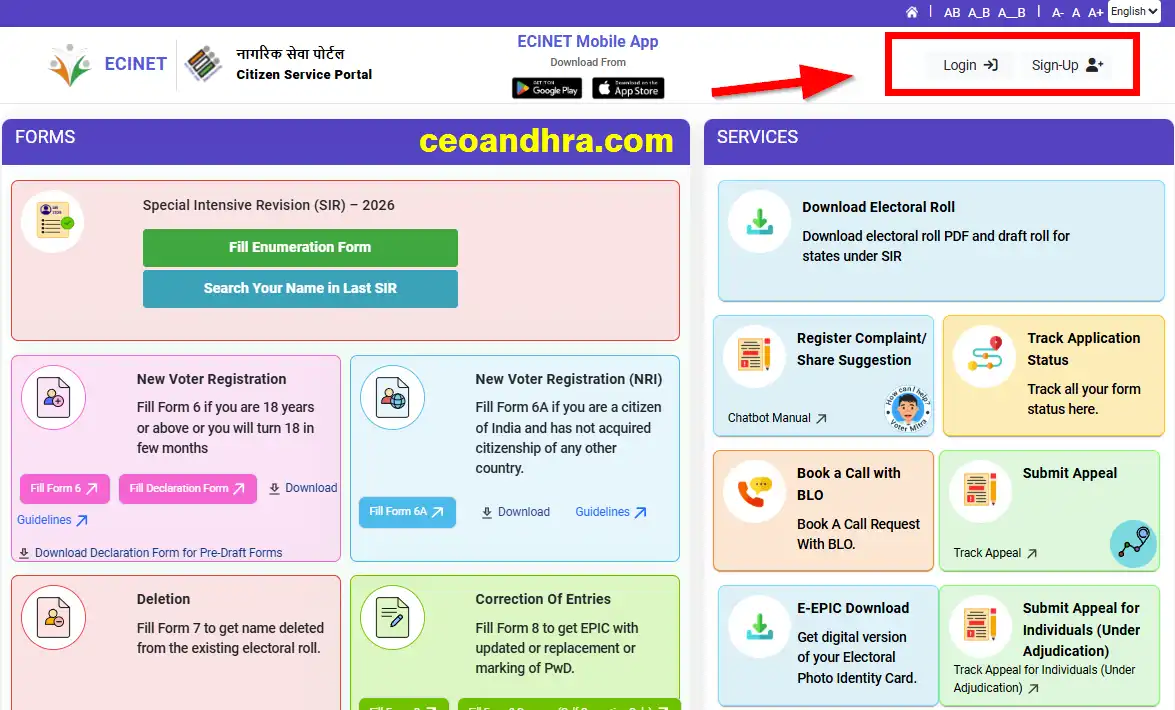
Step 2: Log in to your account
To apply for a new voter card, the applicant must log in to their account, so if you have already created your account at this portal, then you can directly click the sign-in button and use your ID and password to log in to your account.
If you have not created your account on this portal, just click on the sign-up button, and using your mobile number, you can directly create your account within a few seconds.
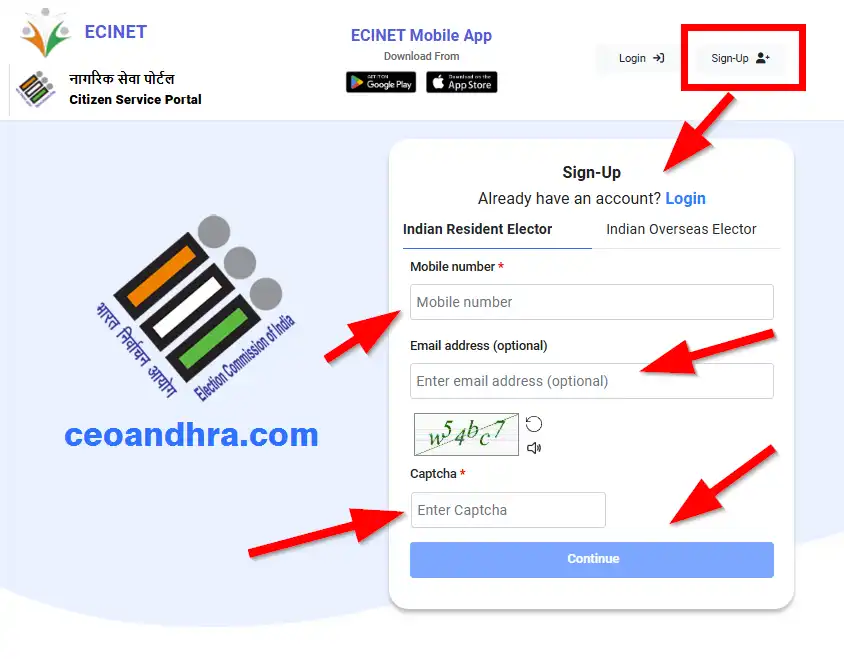
On your given mobile number, you will receive an OTP. Enter the OTP and click on verify and login; then you will be successfully logged in to the ECI Net portal.
Step 3: Start new voter registration
After logging into your account, you will see many options on the dashboard. You can see the new voter registration section. The only section you see is the "full form 6" button; you have to click on this button to open the application form.
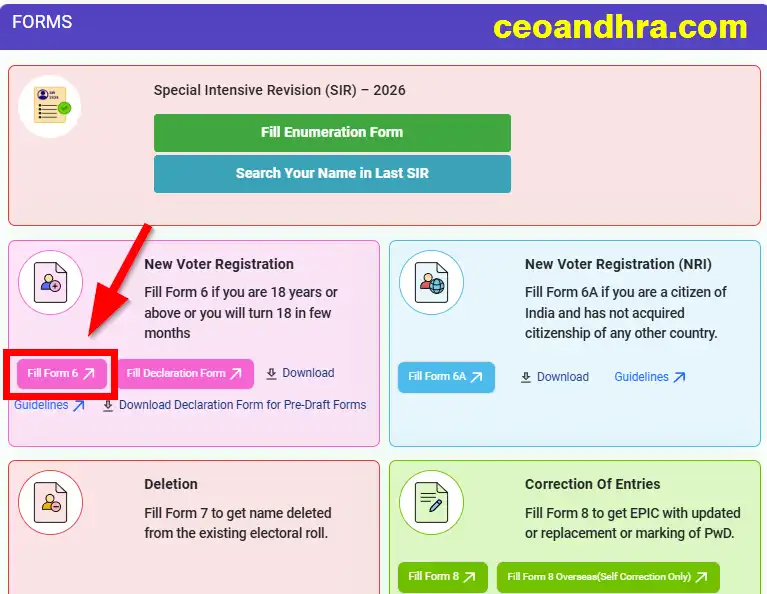
Form 6 is the new voter card registration form. Here you can download the voter card form 6 application PDF to know what you have to fill out, or you can use this form for an offline application.
Step 4: Fill out Form 6
Now you have to fill out the complete application form for a new voter. On this application you have to fill in details as required for the new application.
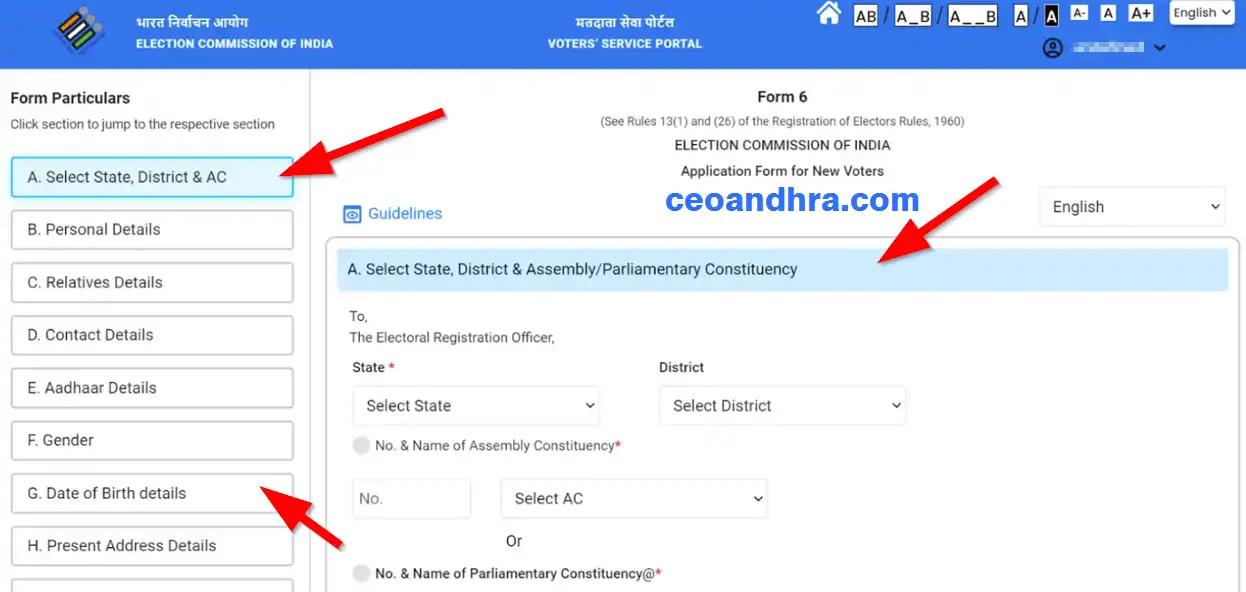
- Select State, District & AC
- Personal Details
- Relatives' Details
- Contact Details
- Aadhaar Details
- Gender
- Date of Birth details
- Present Address Details
- Disability Details
- Family member Details
- Declaration
- Captcha
After submitting your application, you will receive application details along with the application number to your registered mobile number or email address. This application number will help you to check the voter card application status so that you know what the status of your application is. Once you are approved, you can check your name on the Electoral Roll of SIR 2002.
When your application is approved, you will receive your voter card by speed post, or you also can download a PDF direct from the ECI portal.
Download Andhra Pradesh Voter ID Forms (PDF)
Below is a complete list of official forms provided by the Election Commission of India. You can download the PDF for your specific need and submit it to your Electoral Registration Officer.
Form 6: New Registration
Fill Form 6 if you are 18 years or above or you will turn 18 in a few months to register as a new voter.
Form 6A: NRI Registration
For Overseas/NRI Electors. Fill this if you are a citizen of India and have not acquired citizenship of any other country.
Form 7: Deletion of Name
Fill Form 7 to object to a proposed inclusion or to get a name deleted from the existing electoral roll.
Form 8: Correction / Shift
Fill Form 8 for shifting residence, correction of entries, getting a replacement EPIC, or marking of PwD.
Form M: Migrant Electors
This form is for the Migrant Electors of Kashmir who want to cast vote from any one special polling station of Delhi, Jammu and Udhampur.
Form 12C: Postal Ballot
This form is for Migrant Electors of Kashmir who want to cast their vote through a postal ballot.
Important ECI-net Links
| Service | Official Portal Link |
|---|---|
| Apply for New Voter ID (Form 6) | voters.eci.gov.in |
| Check Application Status | track.eci.gov.in |
| Download E-EPIC (Voter PDF) | e-epic.eci.gov.in |
| CEO Andhra Pradesh Portal | ceoandhra.nic.in |
How to download Andhra Pradesh SIR Voter List 2002 from the ECI portal
If you want to download the Andhra Pradesh SIR Voter List 2002 from the ECI portal, please follow the below steps; it will show you how to get your voter list.
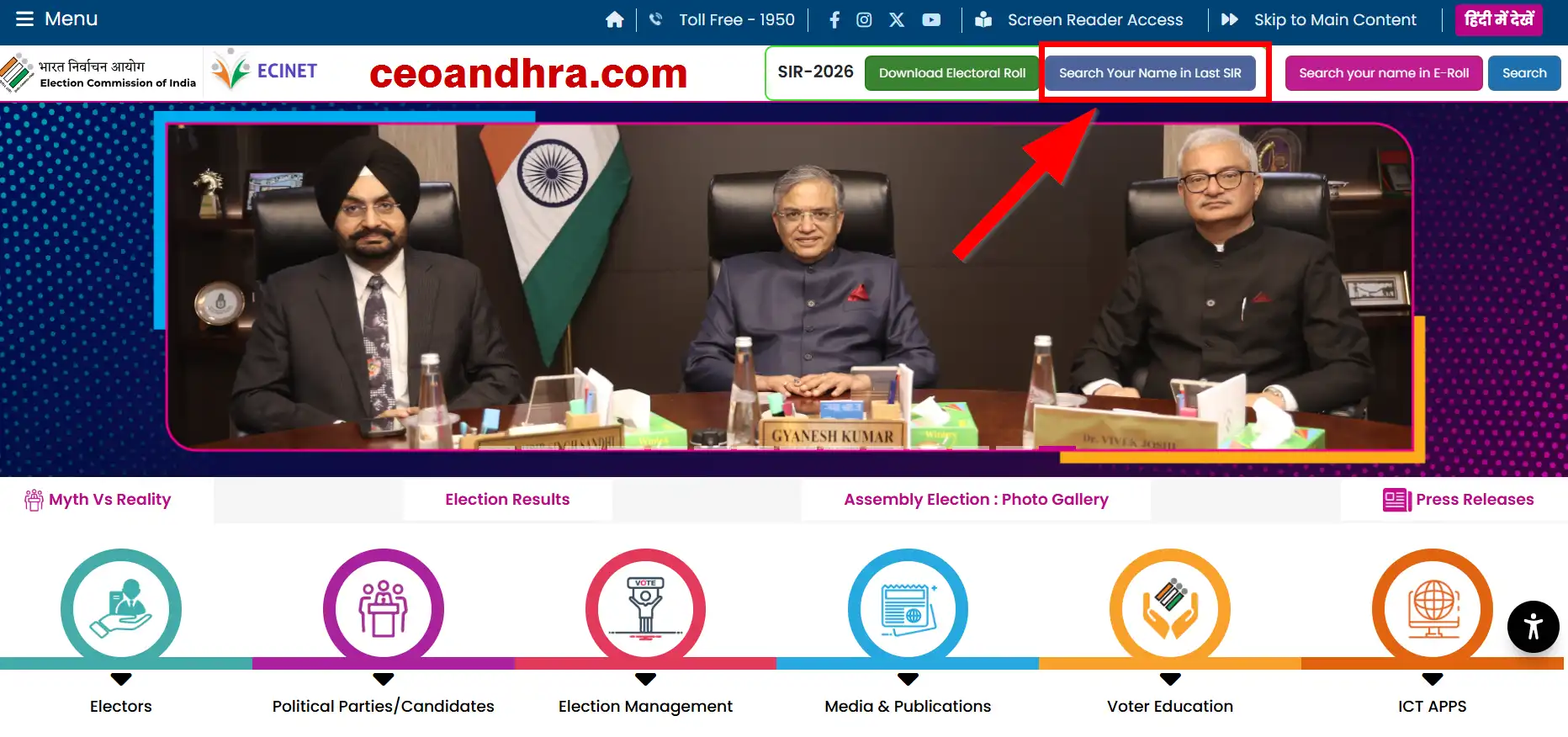
Step 1: First of all, you have to visit the official ECI portal at https://www.eci.gov.in/. On this portal, you can see "search your name in last sir" on the top section of the website. Click on this button to visit the sir voter list page.
Step 2: Now the SIR voter list page (search your name in the last SIR E-Roll) will be open on the screen: https://voters.eci.gov.in/searchInSIR/S2UA4DPDF-JK4QWODSE Click on this link to directly visit the page.
Step 3: On this page, to search your voter list, you have to select some information.
- Select your state
- Select your district
- Select Assembly Constituency
- Select the polling station number and name
- Enter the part serial number
- Enter the electoral full name of the last SIR
- Enter the elector age
- Select the relative type
- Select Elector Relative Full Name
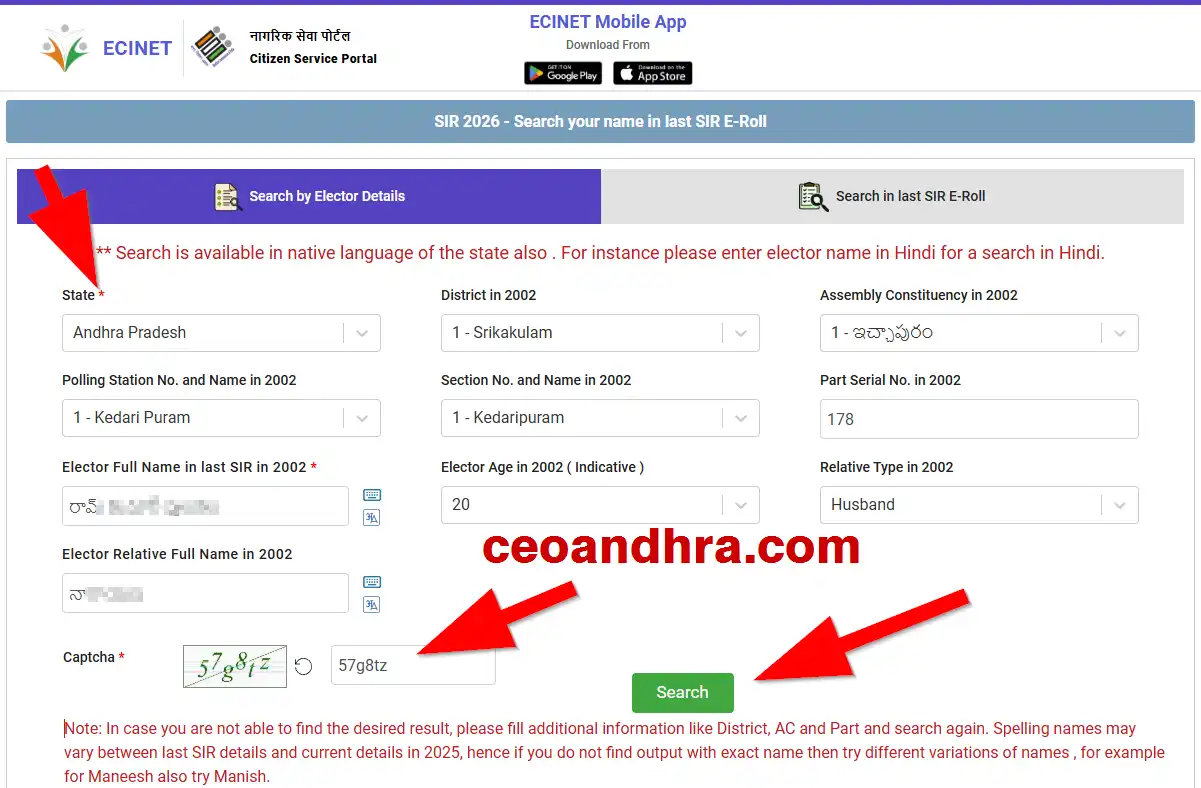
After being given all the information, enter the captcha code in the box and click on the search button.
Step 4: After clicking on the search button, the complete list of voter will display at the bottom with the details of:
- Elector Full Name
- Relative Full Name
- Relative Type Age
- State
- District
- AC No. and Name
- Polling Station No. and Name
- Part Serial No.
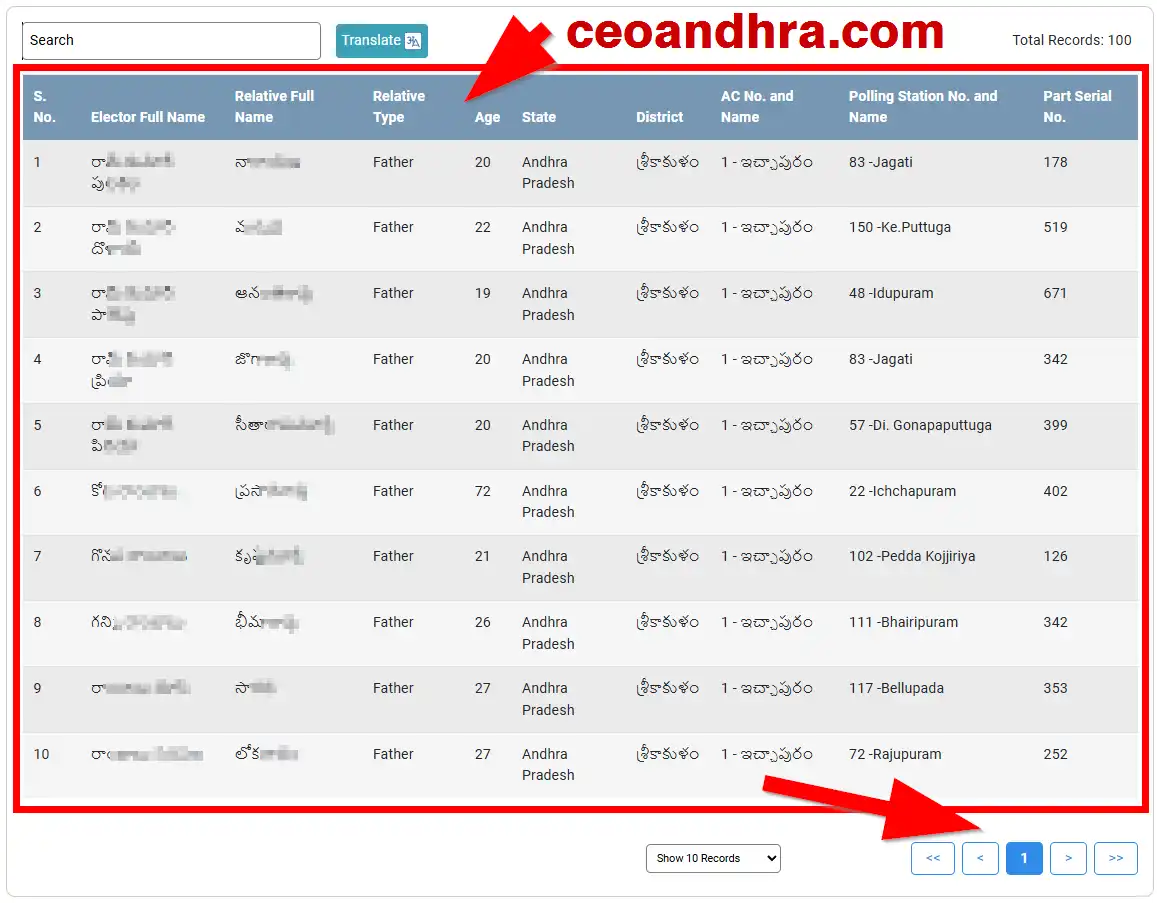
From this list, you can verify your voter details. Now you can download this page or print it out directly.
FAQ for CEO Andhra Pradesh
1. What is the Andhra Pradesh SIR Voter List 2002?
The Andhra Pradesh SIR Voter List 2002 is a old SIR electoral roll that contains the details of registered voters in the state for the year 2002.
2. How can I download the CEO Andhra Voter List 2002 PDF?
You can download the PDF by using the portal ceoandhra.com. Simply select your specific district from the homepage, select your Assembly Constituency, and click on the Download button to preview or download the complete 2002 voter list PDF for your area.
3. What is the official CEO Andhra Pradesh website?
The official CEO Andhra Pradesh government portal is ceoandhra.nic.in.
4. How do I search for my name in the latest Andhra Pradesh Voter List?
To search for your name, you have to visit the official Election Commission of India (ECI) portal https://www.eci.gov.in/. You will need to select your state, district, and assembly constituency and provide your name or part serial number to view your details.
5. Can I apply for a new Voter ID card?
Yes, to apply for a new Voter ID or make corrections, you must visit the official National Voters' Services Portal (NVSP) or the ECI website https://voters.eci.gov.in/ and fill out the "Form 6" online.
6. Are the voter lists for all Andhra Pradesh districts available here?
Yes, our portal ceoandhra.com provides organized links to the 2002 electoral rolls for all major districts, including Srikakulam, Visakhapatnam, Guntur, Krishna, Nellore, Kadapa, Kurnool, and more.
7. What details will I find in the downloaded Voter List PDF?
The downloaded electoral roll PDF has voter information like Elector's Full Name, Relative's Full Name, Age, State, District, Assembly Constituency (AC) Number and Name, Polling Station Number, and Part Serial Number.
Need Help? Contact CEO Andhra Pradesh
Helpline Number
1950
(Available from 10:00 am to 05:30 pm)
Email Support
Office Address
Room No.192, Ground Floor Building No.5,
A.P.Secretariat Velagapudi, Amaravati. 522238